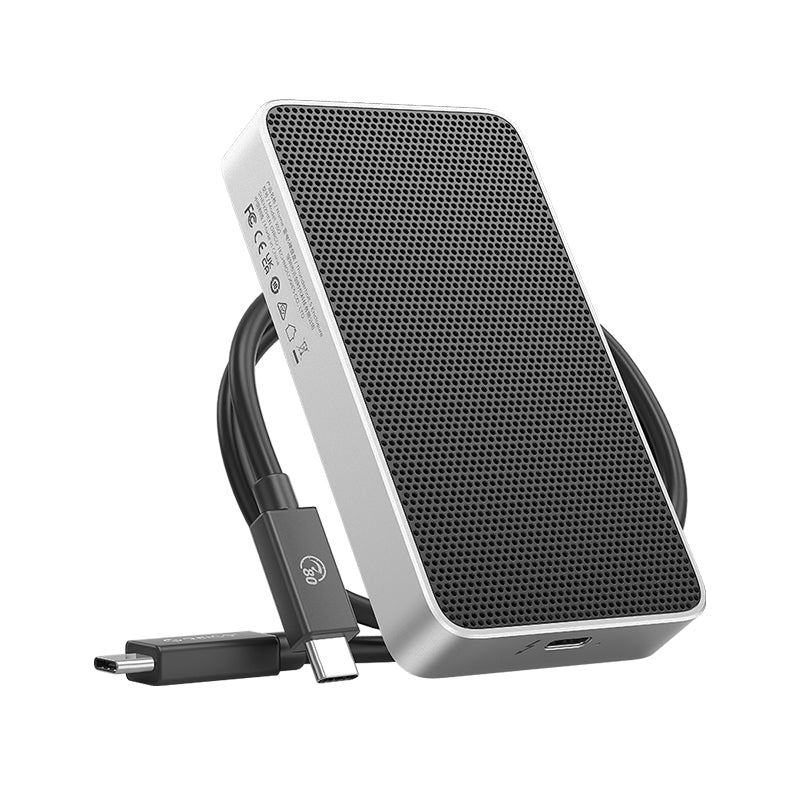
ORICO X50 80Gbps Thunderbolt 5 Compatible Portable SSD/M.2 Enclosure


FAQ
Q1: What is Thunderbolt 5, and how does it differ from Thunderbolt 4/3?
Thunderbolt 5 is the next generation of connectivity, doubling the standard bidirectional bandwidth to 80gbps. While Thunderbolt 4 and 3 are capped at 40gbps, Thunderbolt 5 allows for much faster data transfer and higher-resolution display support, making it the new benchmark for professional workflows.
Q2: Why do I need an 80gbps SSD enclosure?
If you are a creator working with 8k raw video, complex 3d rendering, or massive file backups, 80Gbps significantly reduces waiting times. It provides the necessary headroom to edit directly from the drive with zero latency, future-proofing your setup as file sizes continue to grow.
Q3: Does the enclosure include an internal SSD, and which ones are recommended?
No, this is an enclosure only. To reach 80Gbps speeds, we recommend high-performance m.2 NVMe SSDs (PCIe Gen4 or Gen5) from reputable brands
Q4: Why am I not reaching the maximum 80gbps speed?
Real-world performance depends on the "hardware chain." You must use a Thunderbolt 5 compatible port and the included 80gbps cable. If your computer only supports Thunderbolt 4 or USB4, the speed will be limited to 40gbps. Additionally, your SSD’s own read/write limits will affect the final result.
Q5: What are the benefits of a fanless design compared to fan-cooled enclosures?
Our fanless design uses a 4-layer passive thermal system to achieve 0db silent operation, perfect for quiet studio environments. Unlike enclosures with fans, there are no moving parts to fail or collect dust, offering higher long-term reliability without distracting noise.
Q6: Is this 80gbps enclosure backward compatible with Thunderbolt 4 or USB4 ports?
Yes. It is fully backward compatible with Thunderbolt 4, Thunderbolt 3, and USB4 protocols. It will work seamlessly with your existing devices, though the transfer speed will automatically adjust to the maximum rate supported by your host port.
| Product Name |
Thunderbolt 5 External SSD
|
| Model |
X50 |
| Color | Silver |
| Material | Aluminum Alloy |
| Input Interface |
Thunderbolt 5 |
| Transfer Speed |
Read: 6000MB/s Write: 5800MB/s Note: Speeds are theoretical and may vary depending on SSD and usage environment. |
| Data Cable | USB-C to USB-C, 0.5M, 80Gbps |
| Dimensions | 110 × 60 × 18.7 mm |
| SSD Capacity Options | Diskless |
| Supported Systems | Windows / macOS / Linux |


FAQ
Q1: What is Thunderbolt 5, and how does it differ from Thunderbolt 4/3?
Thunderbolt 5 is the next generation of connectivity, doubling the standard bidirectional bandwidth to 80gbps. While Thunderbolt 4 and 3 are capped at 40gbps, Thunderbolt 5 allows for much faster data transfer and higher-resolution display support, making it the new benchmark for professional workflows.
Q2: Why do I need an 80gbps SSD enclosure?
If you are a creator working with 8k raw video, complex 3d rendering, or massive file backups, 80Gbps significantly reduces waiting times. It provides the necessary headroom to edit directly from the drive with zero latency, future-proofing your setup as file sizes continue to grow.
Q3: Does the enclosure include an internal SSD, and which ones are recommended?
No, this is an enclosure only. To reach 80gbps speeds, we recommend high-performance m.2 nvme ssds (pcie gen4 or gen5) from reputable brands
Q4: Why am I not reaching the maximum 80gbps speed?
Real-world performance depends on the "hardware chain." You must use a thunderbolt 5 compatible port and the included 80gbps cable. If your computer only supports thunderbolt 4 or usb4, the speed will be limited to 40gbps. Additionally, your SSD’s own read/write limits will affect the final result.
Q5: What are the benefits of a fanless design compared to fan-cooled enclosures?
Our fanless design uses a 4-layer passive thermal system to achieve 0db silent operation, perfect for quiet studio environments. Unlike enclosures with fans, there are no moving parts to fail or collect dust, offering higher long-term reliability without distracting noise.
Q6: Is this 80gbps enclosure backward compatible with Thunderbolt 4 or USB4 ports?
Yes. It is fully backward compatible with thunderbolt 4, Thunderbolt 3, and USB4 protocols. It will work seamlessly with your existing devices, though the transfer speed will automatically adjust to the maximum rate supported by your host port.
Original: $199.99
-65%$199.99
$70.00Product Information
Product Information
Shipping & Returns
Shipping & Returns
Description
FAQ
Q1: What is Thunderbolt 5, and how does it differ from Thunderbolt 4/3?
Thunderbolt 5 is the next generation of connectivity, doubling the standard bidirectional bandwidth to 80gbps. While Thunderbolt 4 and 3 are capped at 40gbps, Thunderbolt 5 allows for much faster data transfer and higher-resolution display support, making it the new benchmark for professional workflows.
Q2: Why do I need an 80gbps SSD enclosure?
If you are a creator working with 8k raw video, complex 3d rendering, or massive file backups, 80Gbps significantly reduces waiting times. It provides the necessary headroom to edit directly from the drive with zero latency, future-proofing your setup as file sizes continue to grow.
Q3: Does the enclosure include an internal SSD, and which ones are recommended?
No, this is an enclosure only. To reach 80Gbps speeds, we recommend high-performance m.2 NVMe SSDs (PCIe Gen4 or Gen5) from reputable brands
Q4: Why am I not reaching the maximum 80gbps speed?
Real-world performance depends on the "hardware chain." You must use a Thunderbolt 5 compatible port and the included 80gbps cable. If your computer only supports Thunderbolt 4 or USB4, the speed will be limited to 40gbps. Additionally, your SSD’s own read/write limits will affect the final result.
Q5: What are the benefits of a fanless design compared to fan-cooled enclosures?
Our fanless design uses a 4-layer passive thermal system to achieve 0db silent operation, perfect for quiet studio environments. Unlike enclosures with fans, there are no moving parts to fail or collect dust, offering higher long-term reliability without distracting noise.
Q6: Is this 80gbps enclosure backward compatible with Thunderbolt 4 or USB4 ports?
Yes. It is fully backward compatible with Thunderbolt 4, Thunderbolt 3, and USB4 protocols. It will work seamlessly with your existing devices, though the transfer speed will automatically adjust to the maximum rate supported by your host port.
| Product Name |
Thunderbolt 5 External SSD
|
| Model |
X50 |
| Color | Silver |
| Material | Aluminum Alloy |
| Input Interface |
Thunderbolt 5 |
| Transfer Speed |
Read: 6000MB/s Write: 5800MB/s Note: Speeds are theoretical and may vary depending on SSD and usage environment. |
| Data Cable | USB-C to USB-C, 0.5M, 80Gbps |
| Dimensions | 110 × 60 × 18.7 mm |
| SSD Capacity Options | Diskless |
| Supported Systems | Windows / macOS / Linux |
FAQ
Q1: What is Thunderbolt 5, and how does it differ from Thunderbolt 4/3?
Thunderbolt 5 is the next generation of connectivity, doubling the standard bidirectional bandwidth to 80gbps. While Thunderbolt 4 and 3 are capped at 40gbps, Thunderbolt 5 allows for much faster data transfer and higher-resolution display support, making it the new benchmark for professional workflows.
Q2: Why do I need an 80gbps SSD enclosure?
If you are a creator working with 8k raw video, complex 3d rendering, or massive file backups, 80Gbps significantly reduces waiting times. It provides the necessary headroom to edit directly from the drive with zero latency, future-proofing your setup as file sizes continue to grow.
Q3: Does the enclosure include an internal SSD, and which ones are recommended?
No, this is an enclosure only. To reach 80gbps speeds, we recommend high-performance m.2 nvme ssds (pcie gen4 or gen5) from reputable brands
Q4: Why am I not reaching the maximum 80gbps speed?
Real-world performance depends on the "hardware chain." You must use a thunderbolt 5 compatible port and the included 80gbps cable. If your computer only supports thunderbolt 4 or usb4, the speed will be limited to 40gbps. Additionally, your SSD’s own read/write limits will affect the final result.
Q5: What are the benefits of a fanless design compared to fan-cooled enclosures?
Our fanless design uses a 4-layer passive thermal system to achieve 0db silent operation, perfect for quiet studio environments. Unlike enclosures with fans, there are no moving parts to fail or collect dust, offering higher long-term reliability without distracting noise.
Q6: Is this 80gbps enclosure backward compatible with Thunderbolt 4 or USB4 ports?
Yes. It is fully backward compatible with thunderbolt 4, Thunderbolt 3, and USB4 protocols. It will work seamlessly with your existing devices, though the transfer speed will automatically adjust to the maximum rate supported by your host port.